The Essence of Network Security with MikroTik
In today’s digital landscape, where cyber threats constantly evolve, network security is more than a necessity – it’s an undeniable priority. For businesses and home users seeking robust and flexible defense, the MikroTik Firewall, integrated with the powerful RouterOS operating system, stands out as a prominent solution. But what exactly makes the MikroTik firewall so effective, and how can it be the backbone of your network security strategy?
This article is a complete guide. We will delve into the fundamental concepts of the MikroTik Firewall, explore its advanced functionalities, detail best practices for firewall configuration, and present practical examples that will empower you to proactively protect your network infrastructure. Prepare to unlock the potential of MikroTik and elevate the level of cybersecurity in your digital environment.
What is MikroTik Firewall and Its Importance in Network Protection?
The MikroTik RouterOS Firewall is a comprehensive security tool designed to provide granular control over network traffic. It operates as an intelligent control point, inspecting every data packet attempting to enter or leave your network. Based on a set of predefined rules, the firewall decides whether traffic should be allowed or blocked. This filtering capability, which includes both stateful and stateless inspection, is crucial for:
- Prevention of Unauthorized Access: Preventing external attackers from accessing your confidential systems and data.
- Outbound Traffic Control: Ensuring that your devices do not communicate with malicious or unwanted destinations on the internet.
- Efficient Data Flow Management: Optimizing network performance, prioritizing critical traffic, and limiting misuse of bandwidth, which is vital for network optimization.
Advanced Firewall Features for Robust Defense
MikroTik RouterOS goes far beyond the basics in terms of firewall functionalities, offering an impressive set of features that make it a superior choice for various network security scenarios:
- Stateful and Stateless Packet Inspection: The flexibility to analyze the context of connections (stateful) or just individual packets (stateless) provides an ideal balance between security and performance.
- Layer-7 Protocol Detection: A powerful feature that allows identifying and controlling traffic based on the application type (e.g., Facebook, YouTube, BitTorrent), not just ports and IPs. This is fundamental for bandwidth control and preventing network misuse, being a key tool for network administrators.
- Peer-to-Peer (P2P) Protocol Filtering: Blocks or limits P2P application traffic, which often consumes excessive bandwidth and can be vectors for malware, compromising information security.
- Detailed Traffic Classification: MikroTik allows classifying traffic based on a wide range of criteria, including:
• Source MAC address
• IP addresses (network or list) and address types
• Port or port range
• IP protocols (TCP, UDP, ICMP, etc.)
• Protocol options (TCP flags, ICMP type, MSS)
• Incoming or outgoing packet interface
• Internal flow and connection marks
• DSCP (Differentiated Services Code Point) byte
• Packet content
• Packet arrival rate and sequence numbers
• Packet size
• Packet arrival time
This granularity allows creating extremely precise firewall rules tailored to your specific network security needs.
Essential MikroTik Firewall Modules: Understanding the Structure
To understand the operation of the MikroTik Firewall, it is crucial to know its three main modules, which work together to protect your network:
- Filter/Raw: This module is the core of packet filtering. It is used to allow or deny traffic based on defined policies. The raw table is particularly efficient for discarding unwanted traffic even before connection tracking is initiated, optimizing router resource usage and improving network performance.
- Mangle: The mangle module is used to mark packets and connections. These marks can be used by other RouterOS functionalities, such as queue management (QoS) or routing, to apply specific actions to certain types of traffic. For example, you can mark voice packets to ensure they have priority on the network, essential for quality of service.
- NAT (Network Address Translation): The NAT module is fundamental for networks that use private IP addresses and need to communicate with the internet (which uses public IP addresses). It allows the translation of source IP addresses (srcnat) and destination IP addresses (dstnat), and is also used for port redirections and other access configurations.
Chains: The Logic Behind Firewall Rules in MikroTik
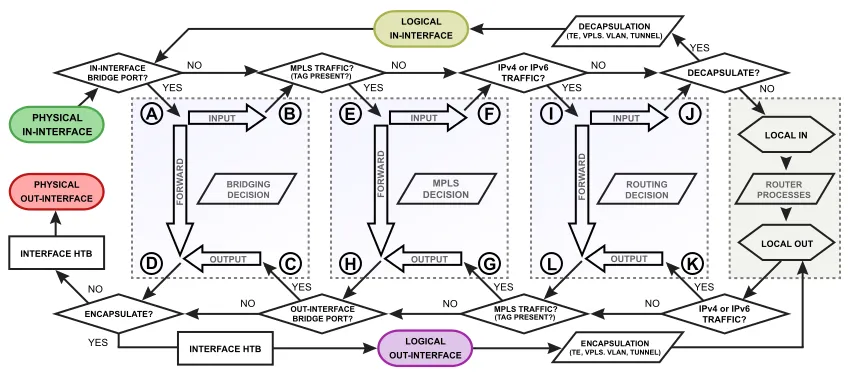
Firewall rules in MikroTik are organized into chains, which are sequential lists of rules processed from top to bottom. When a packet arrives at the firewall, it is compared with the rules in the chain, one by one, until a match is found. Once a rule is matched, the specified action is executed, and processing for that chain is usually stopped (unless the action is passthrough).
Each firewall module has its own predefined chains, representing different points in the packet flow through the router:
Raw:
- prerouting: Processes packets before any routing decision.
- output: Processes packets generated by the router itself.
Filter:
- input: Processes packets destined for the router itself.
- forward: Processes packets being routed through the router (from one interface to another).
- output: Processes packets generated by the router itself.
Mangle:
- prerouting: Marks packets before routing.
- input: Marks packets destined for the router.
- forward: Marks packets routed through the router.
- output: Marks packets generated by the router.
- postrouting: Marks packets after routing, before leaving the interface.
NAT:
- srcnat: Translates the source IP address of packets leaving the network.
- dstnat: Translates the destination IP address of packets entering the network (used for port redirection).
Best Practices for a Robust MikroTik Firewall Configuration
Configuring an effective firewall goes beyond just adding a few rules. Adopting best practices ensures security, performance, and ease of maintenance. Follow these tips to optimize your firewall rules:
- 1. Organization is Key: Group your firewall rules logically. Use comments in each rule to describe its purpose. This facilitates understanding and debugging, especially in complex network configurations.
- 2. Use User-Defined Chains: For more complex scenarios, create your own chains and call them from predefined chains. This helps modularize your rules and maintain organization, contributing to more efficient network management.
- 3. Prioritize established,related: Place rules that allow return traffic from already established or related connections (connection-state=established,related) at the top of your input and forward chains. This ensures that legitimate traffic is not blocked and optimizes processing, as most packets will match these rules, improving firewall performance.
- 4. The Final Drop Rule: Always include an explicit drop rule at the end of the input and forward chains. This rule (action=drop) should discard all traffic that has not been explicitly allowed by previous rules. This implements a security policy of “what is not explicitly allowed, is denied,” essential for a secure network.
- 5. Protection Against Common Attacks: Implement rules to mitigate known attacks, such as port scanning, denial-of-service (DoS) attacks, and brute-force attempts. MikroTik offers specific matchers for this, such as psd (Port Scan Detection) and connection-limit, strengthening cybersecurity.
- 6. Efficient Rule Placement: The order of rules matters. Place more specific rules that are likely to be matched more frequently at the beginning of the chains to optimize firewall performance. Rules that discard unwanted traffic should come before rules that allow traffic, directly impacting network efficiency.
- 7. Monitor and Adjust Constantly: A firewall is not a “set and forget” configuration. Monitor firewall logs regularly to identify unauthorized access attempts, unusual traffic, or rules that may be causing undue blocks. Adjust your rules as needed to maintain optimal security and performance, ensuring network maintenance.
Conclusion: Strengthening Your Network with MikroTik Firewall
The MikroTik Firewall, with its wide range of functionalities and the flexibility of RouterOS, is an indispensable tool for any network administrator seeking control and security. From basic protection against unauthorized access to implementing complex traffic policies and mitigating attacks, MikroTik provides the necessary tools to build a robust and resilient network infrastructure.
By following best practices for firewall configuration and understanding the logic behind firewall chains and modules, you will be able to create a more secure and efficient digital environment. Remember that security is a continuous process of learning and adaptation. Stay updated with the latest threats and continue to refine your firewall rules to ensure the continuous protection of your network.
For a better understanding of the topic, we recommend reading the following articles here on the blog:
- Mikrotik Port Forwarding with Winbox – Understand how to efficiently configure redirection rules.
- How to Open Internal Port in MikroTik Firewall using Winbox: Practical Guide with Real Example – A complete step-by-step guide with an applied example to facilitate understanding.
These complementary readings will help clarify important concepts and ensure a more secure and effective application of configurations.
Visit the EMNews blog and stay up-to-date with the latest news, analyses, and trends in the world of technology and telecommunications!